Your catalog, matched to every channel.
Comerz.ai proposes matches between your catalog structure and what your channel already has. You review every category, attribute, and brand mapping before it affects a single sync.
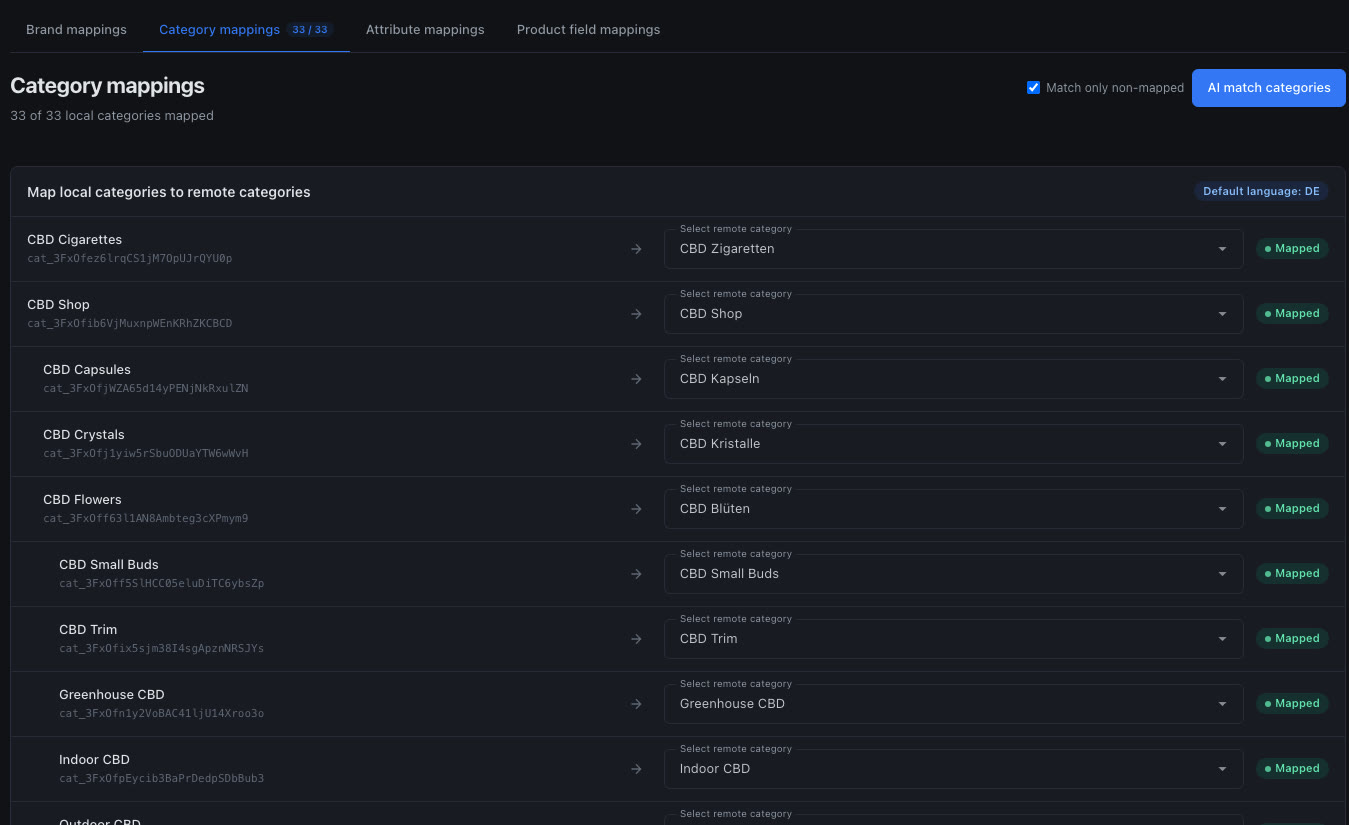
The matching work you used to do in spreadsheets.
One click, nothing silent
Press AI match and Comerz.ai proposes a remote match for what isn't mapped yet. Each suggestion lands as a proposal with a clear status, never as a silent change. You accept, adjust, or pick a different match from the channel's own list.
It speaks your languages
Matches work across your store's languages. CBD Flowers finds CBD Blüten, and CBD for Pets finds CBD für Tiere.
Categories, attributes, brands
One workflow for your whole catalog structure, with its own tab for each. Product fields have a mapping tab of their own, too.
Progress you can see
Open any tab and you see how much of it is mapped, so you always know what's left before a channel is ready to sync.
Only what's missing
Match only non-mapped keeps the AI away from decisions you've already made. Your existing mappings stay put.
From two catalog structures to one clean mapping.
Connect a channel
Your categories, attributes, and brands arrive with the channel's own taxonomy beside them.
Ask for matches
One click and the AI proposes matches for everything it can pair.
You review
Accept, adjust, or pick another match. Nothing counts until you say so.
Sync with confidence
Every sync after that uses the mapping you approved, in every language you sell.
Suggestions, not surprises.
The AI is good at matching, and you're better at knowing your store. Every proposal waits for your OK, and mappings only guide a sync after you've approved them.